|
Profile Manager
AIRCRAFT
As mentioned in Getting Started, the first screen shows all the aircraft in your system, as well as the profile assigned to each one.
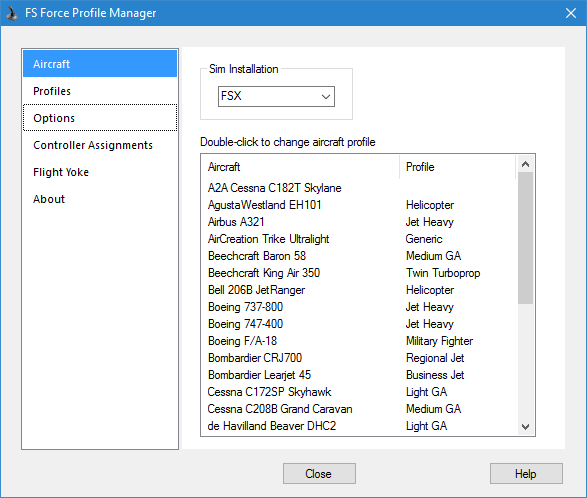
To assign a different profile, double-click on the aircraft. Each time you run the Profile Manager, it scans the Aircraft folders in FSX to see if you have added any new aircraft. If so, it adds them to the list, but leaves the profile blank, so you can make your own assignment.
PROFILES
The Profiles page shows the profiles available in your system, with buttons to create new ones, edit existing ones, or to rename or delete profiles. Click here for a whole section devoted to profiles.

OPTIONS
This page allows you to set various options relating to FS Force.
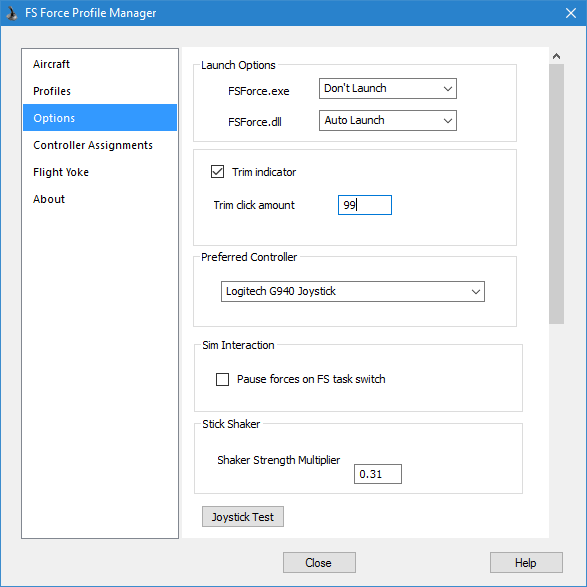
Launch Options : Use these options to control how FS Force is started.
-
Auto Launch means FSX will automatically start FS Force.
-
Prompt means FSX will ask each time
-
Don't Launch means FSX will not launch FS Force.
In order for FS Force to be fully functional, both the EXE and the DLL need to be running. The DLL can only be launched by FSX when it starts, whereas the EXE can either be launched by FSX, or started later by the user.
Trim Options
-
Trim Indicator : If you select this, a small window will display briefly each time you make trim changes, showing the current trim position.
-
Click Amount : determines how much the trim changes with each click. The full range of trim motion spans 20,000 units.
Other Options
-
Pause forces on FSX task switch. With this option selected, FS Force will pause forces when FSX is switched to the background. However, if you fly with one or more separate windows opened (ie radio stack, or other views) in the un-docked configuration, every time you click on one of these windows your joystick forces will cut out, since the main FSX window has gone inactive. In this situation it is best to leave this option unchecked.
-
Preferred Controller. If you have more than one force-feedback controller, you can use this to determine which one will be used by FS Force to play back force feedback effects.
-
The Joystick Test button launches the Joystick Capabilities Wizard. This wizard will lead you through a simple test to determine how your joystick implements certain features of DirectX.
-
Stick Shaker. You can adjust this value to increase or decrease the shaking force that you feel when the "stick shaker" activates in the flight simulator. This value is a simple multiplier. 1.0 is the default. A value of 2.0 would double the forces, whereas a value of 0.8 would reduce forces by 20%. Of course this only applies to aircraft that actually have a stick shaker, such as heavy jets. The stick shaker effect activates when FSX determines that the aircraft is in a stalled condition. FSX displays the word "STALL" in the lower right corner of the screen when this happens.
CONTROLLER ASSIGNMENTS
The Controller Assignments page was described thoroughly in the Getting Started section.
FLIGHT YOKE
Please see the Flight Yoke Add-on page for a description of this page.
|